Ask a teammate
CEO→CTO
“Is the auth rewrite safe to merge?”
CTO Yes. Tests green since 14:02, one flaky spec quarantined.
The question lands in CTO's tab. CTO works it there, and the answer comes back into CEO's conversation.
Run Claude Code , Codex , Antigravity , Kimi & Grok side by side and let one orchestrate the rest. 100% local, on the subscriptions you already pay for.
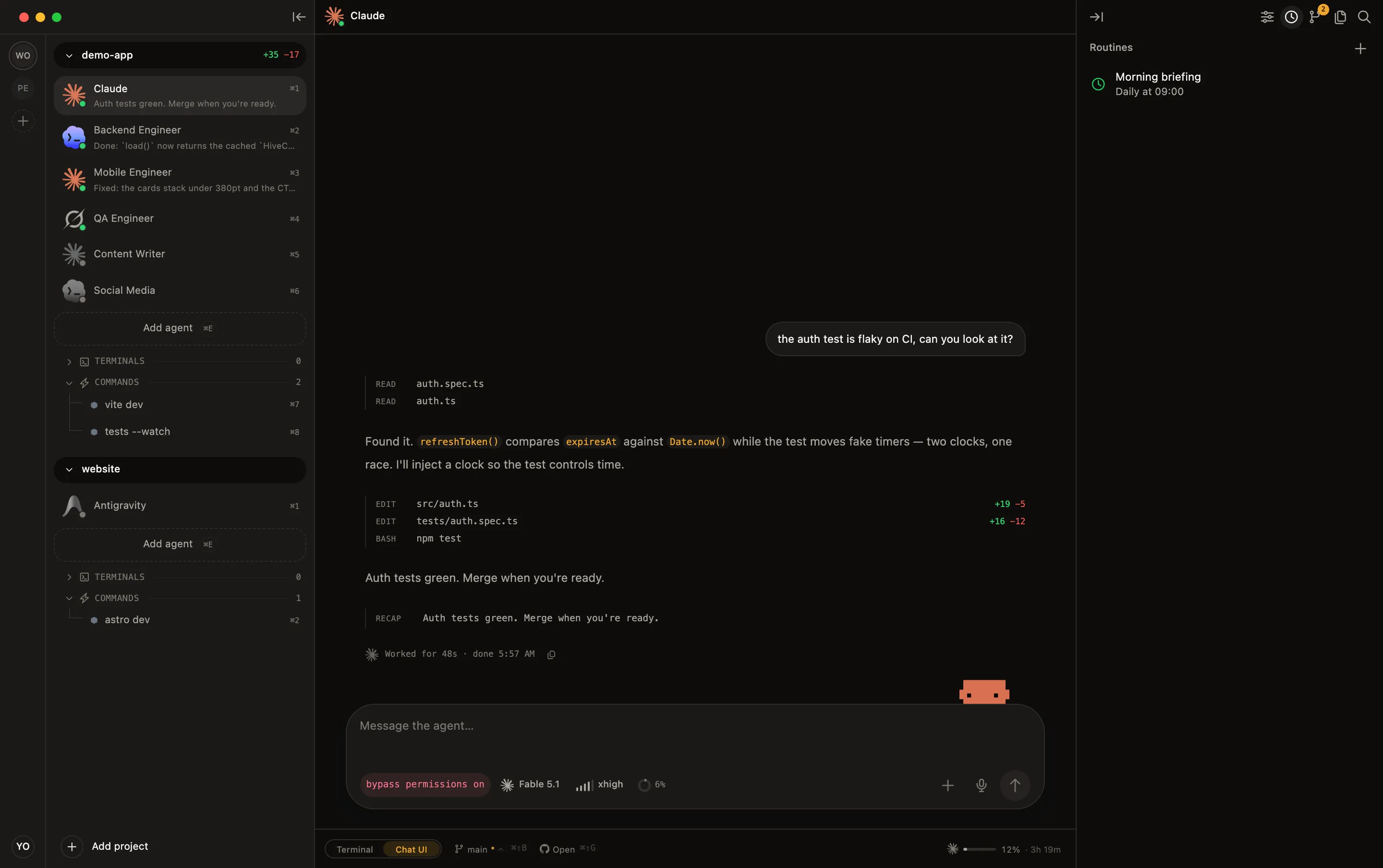
Claude Code, Codex, Antigravity, Kimi, OpenCode, Amp, Cline, Grok, plus any dev server, watcher, or build command. No lock-in, no reselling your tokens.
Auto-detects Node, Laravel, Rust, Go, Python & Rails the moment you open a project.
"I'm CTO of a group with five-plus companies, so three or four projects open at once is just my normal day. Doing that across Cursor and the stock macOS terminal was a mess, and I kept losing track of which agent was doing what. So I built HiveTerm. Today I run 4 projects and 9 agents in parallel and know exactly what each one is doing."

"Three things running at once: Claude Code, Codex, and my dev server. Hive is the first time I could actually watch what each one was doing instead of alt-tabbing and guessing. And the sub-agent tree got me. Claude spins up its own helpers and you just see them show up."

AI agents supported
routine templates to start from
macOS, Windows & Linux
native, no Electron
Define it in YAML, review and ship with git, search every file, and talk to your agents, all without leaving HiveTerm.
A routine is a scheduled task for an agent already in your sidebar: daily, weekdays, weekly, or every N hours. Agent stopped? HiveTerm starts it. Busy? It interrupts and injects the task. Watch it, reply mid-run, run it now, or pause.
12 commits on main, 3 open PRs. The auth rewrite is the one I'd look at first. Tests are green.
Runs in that agent's own tab. If it's stopped, HiveTerm starts it first.
Pairs with your desktop over a QR code. Agents keep running on your machine; your phone joins the same session, live.
Define every agent and process once. Commit it to the repo. Your teammate clones, opens the project, and gets the exact same workspace, same agents, same env, same instructions.
# Your whole stack, versioned in git
name: My App
bees:
  claude:
    type: agent
    command: claude
    instructions: "Senior engineer. Ship clean PRs."
  api:
    command: npm run dev
    auto_start: true
    restart_on_change: ["src/**"]
  worker:
command: php artisan queue:workA live diff panel, inline commit and push, one-click pull requests. When an agent finishes, hit "Ask Claude" and it writes the commit message for you.
A built-in file tree and VSCode-style search across your whole project, fuzzy-find by name, or grep every line with case, whole-word and regex toggles.
Press a key, say what you want, and the text shows up in the agent's input. Useful when you've got an idea but don't feel like typing two paragraphs.
Split your window into a live grid, Claude Code on the left, Codex on the right, your dev server and tests below. Four different agents from four vendors, every pane a real terminal, all visible at once. No more alt-tab roulette to find which agent needs you.
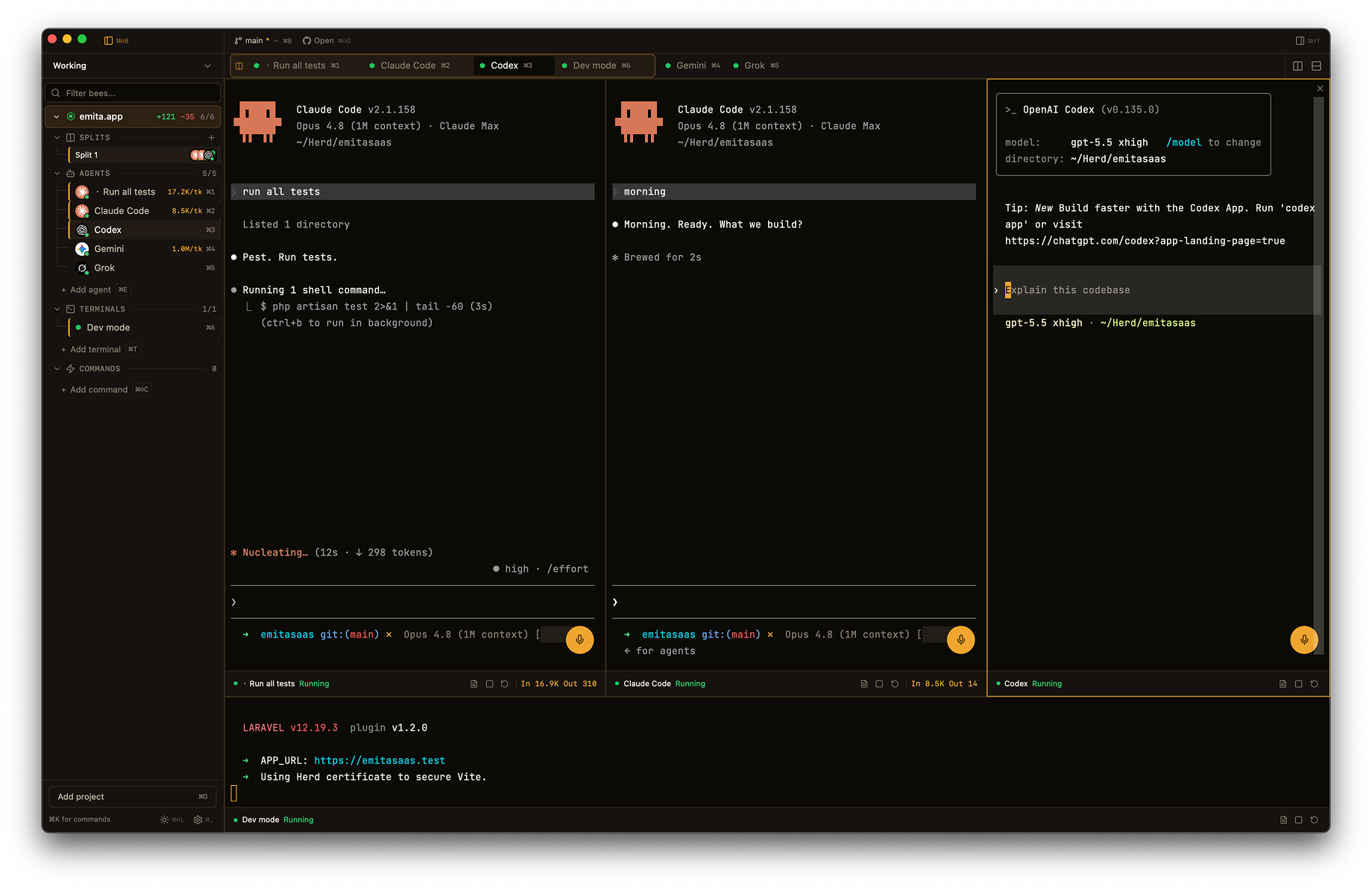
Drag panes into 2-up, 3-up, or a 2×2 grid. Resize live, no restart.
Save a layout as a group, "Backend trio", "Review pair", and reopen the whole arrangement in one click.
Focus follows your click, type into any agent without losing the others.
Processes auto-restart on non-zero exit. When an agent crashes, you see the exit code, the last 30 lines, and a Restart button.
Build done, test failed, agent stuck? You get a native OS notification, not a blinking tab you might miss.
A warm light/dark palette that follows your OS, five bundled mono fonts, and a UI translated into English, Portuguese & Spanish.
Remap, disable or reset any keyboard shortcut in Settings → Hotkeys. Conflicts are caught as you bind, and the essentials, tab switching, copy and paste, stay protected.
Through a built-in MCP server, your agents spawn their own sub-agents, read each other's output, and ping you when they're done, and you watch the whole tree live in your sidebar.
An agent hands a piece of work to a fresh sub-agent and keeps going on its own task, no setup from you.
Sub-agents only see the agents and processes in their own project. No cross-talk, no surprises across workspaces.
From CEO, ask CTO. The question shows in CTO's tab. The answer comes back here.
“Is the auth rewrite safe to merge?”
The question lands in CTO's tab. CTO works it there, and the answer comes back into CEO's conversation.
“Run the suite on the auth branch and report back.”
A helper appears under Sub-agents, does the job in its own tab, and pings you when it's done.
“Every morning, summarize what changed and what needs me.”
A routine attaches to that agent's row and fires into its tab, on time, whether or not you're looking.
“Add a reviewer on Codex, call it Reviewer, give it a face.”
A real agent under Agents in the sidebar, saved to hive.yml, ready the next time you open the project.
| Feature | HiveTerm | Conductor | Warp | T3 Code |
|---|---|---|---|---|
| Scheduled routines on your agent | ||||
| iPhone & Android companion | ||||
| Sub-agent tree (MCP) | ||||
| Live split-pane grid of different agents | ||||
| Runs your dev stack (servers, workers) | ||||
| macOS, Windows & Linux | ||||
| Config-as-code workspace | ||||
| Claude, Codex, Antigravity & Grok | ||||
| Inline diff, commit & PR | ||||
| Voice prompts | ||||
| 3 languages (EN/PT/ES) |
No limits. Run as many projects, agents, and sub-agents as you want.
No credit card. Not for you? Full refund within 30 days.
Downloads the app. Your free trial starts inside.
14-day free trial · 30-day money-back guarantee
Open a project, add your agents, and watch them work side by side. You'll know in 60 seconds if it's for you.